


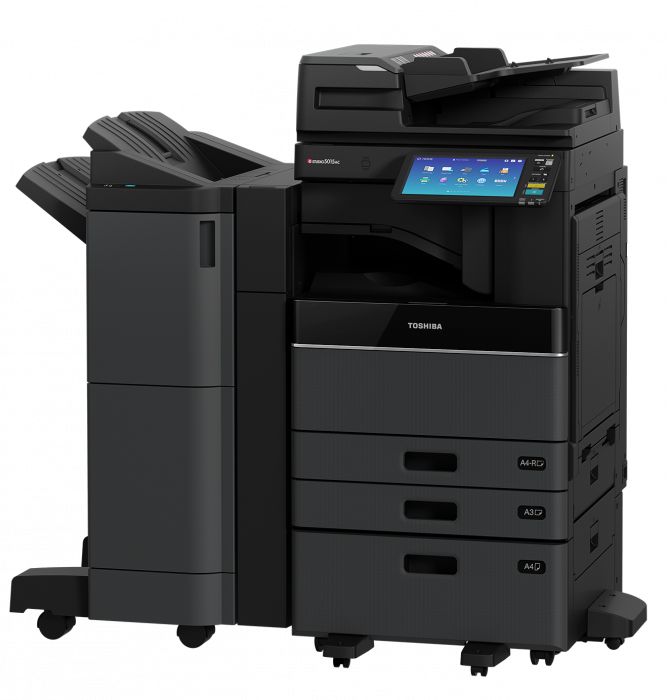
Toshiba e-STUDIO2010AC
The Toshiba e-STUDIO2010AC makes Complex functions simple. This entry-level colour schemed printer can be customised to each business's daily specifications when functionality is a priority.
Feature Listing
- 20 Pages Per Minute
- Intuitive access to all the functions thanks to the tablet-style 10.1” colour touch screen.
- Mobile printing makes it easier to provide more open networking.
- Print/Copy/Scan
20 Pages per Minute
Fast 20ppm for everyday use in the workplace.
10.1" Touchscreen
User-friendly UI touchscreen so everyone in your office can use it with ease and no struggle.
Mobile printing
Print wherever, whenever with Toshiba's smart mobile printing feature.
All in one
Print, Copy or Scan the choice is yours with this Toshiba all in one printer.
NEXT TECHNOLOGY IN ADVANCED E-BRIDGE
Toshiba’s next-generation e-BRIDGE architecture includes an integrated web browser, 4 GB RAM, and the Toshiba stable hard disc drive, allowing the MFP to drive Toshiba’s internally designed solutions as well as third-party applications.
Make a lasting impression with high-quality colour and monochrome document display at resolutions of up to 600 dpi x 1200 dpi.
SIMPLE, SMART, AND ELEGANT.
A new 10.1″ tablet-style touch screen with an integrated web browser is simple to use and adaptable to your specific requirements.
Flexible integration with third-party solution applications, as well as an integrated web browser, centralises the workflow and puts it at your fingertips. All of this is part of the bold new look we’re introducing with our new e-STUDIO collection.
AVAILABILITY
FAX Preview (of received FAX) and an enhanced scan preview with the ability to rotate the image and adjust the page enable you to check and proof your work on the fly.
CONNECTIVITY TO THE CLOUD IS SEAMLESS
Optional e-BRIDGE Plus Connectors for Microsoft OneDrive, Google Drive, and Dropbox allow you to send documents to or print from these cloud services directly from the MFP. NFC authentication is supported for Business Cloud Services (Office 365).
IMPROVED CUSTOMIZATION FUNCTIONS
We’ve improved the User Interface customization functions and enhanced our embedded applications platform to give you a better user experience. We’ve also improved the scanning feature by allowing you to change the scan size.
CONVENIENCE IS BUILT IN
Optional card readers not only provide quick and easy access to your print jobs, but also improve data protection. As does the latest HCD-PP protection standard (Hard Copy Device Protection).
PLANETARY RESPONSIBILITY
Innovation means that our world is considered, which is exactly what Toshiba does. This cutting-edge MFP is RoHS compliant and saves money by using recycled plastics and a low-power Super Sleep Mode.
The e-STUDIO2010AC Series complies with the following international environmental criteria, as well as Energy Star certifications in different overseas markets.
GENERAL
- Control Panel
- 10.1″ Color WVGA Touch Screen Tilting Display
- Dimensions & Weight
- 575 (W) x 586 (D) x 662 (H) mm and Approx. 57 kg
- Paper Size & Weight
- Cassette: A5R-A3, 60-163 g/m2. Bypass: 100 x 148 mm-A3 mm, 52-209 g/m2.
- Controller Type
- Toshiba e-BRIDGE Next
- Warm-up Time
- Approx. 13 Seconds from low power mode
- Inner Output Tray
- 550-sheet capacity
- Paper Capacity
- 1 x 250 sheets (Cassettes), 1 x 100 sheets (Bypass). Maximum 2,900 sheets
- Memory
- Toshiba Secure HDD 320 GB. Std 2MB RAM, Max 4GB RAM
- Print Speed
- Colour: 20 ppm (A4)
- Automatic Duplex
- Automatic Duplex Unit (60-163 gsm)
- Interface
- RJ-45 Ethernet (10/100/1000 Base-T), USB 2.0 (High-speed), Optional 802.11b/g/n Wireless LAN, Optional Bluetooth
- Resolution
- 600 x 600 dpi, 600 x 1,200 dpi (1 bit, PostScript driver only)
- Page Description Languages
- PCL5e, PCL5c, PCL6 (PCL XL), PS3, PDF, XPS, JPEG
- Print Functions
- Universal Printer Driver, Driver Templates, Driver plug-ins*, Print from USB, Hold print, Tandem printing, Email Direct Printing
- Supported Systems
- Windows® Vista, Windows Server 2008/R2, Windows 7, 8, 8.1, 10, Windows Server 2012/R2, Macintosh® (Mac OS × 10.6, 10.7, 10.8, 10.9, 10.10, 10,11), Unix®, Linux®
SCAN
- Scan Functions
- Scan to File, E-mail, e-Filing, WS Scan, USB, Scan Preview
- Resolution
- Maximum 600 x 600 dpi
- Scan Speed
- Reversing Automatic Document Feeder2): up to 73 ipm (300 dpi) in colour and monochrome
- Document Feeder
- 100-sheet capacity, A5R-A3, 35-157 g/m2
- Scan Modes
- Standard: Full Color, Auto Color, Monochrome, Grayscale
- File Formats
- Monochrome: TIFF-Multi/Single Page, PDF-Multi/Single Page, Searchable PDF (Opt.), XPS-Multi/Single Page, DOCX (Opt.), XLSX (Opt.), PPTX (Opt.) Color/Grayscale: JPEG, TIFF-Multi/Single Page, PDF-Multi/Single Page, Slim PDF, PDF/A, PDF/A-2, Searchable PDF (Opt.), XPS-Multi/Single Page, DOCX (Opt.), XLSX (Opt.), PPTX (Opt.)
COPY
- Resolution
- Scan: 600 x 600 dpi Print: 600 x 600 dpi, 2400 x 600 dpi with smoothing
- Colour Modes
- Auto-Colour (ACS), Full Colour, Twin Colour, Mono Colour, Monochrome
- First Copy Output Time
- Colour: Approx. 9.5 seconds, Monochrome: Approx. 7.1 seconds
- Colour Settings
- Hue, Saturation, Colour Balance, RGB adjustment 5 one-touch modes
- Zoom
- 25% to 400% platen and Document Feeder
- Copy Modes
- Black, Full Colour, Auto Colour, Twin Colour, Mono Colour and Auto Colour Selection (ACS)
- Copy Functions
- Electronic Sort, Rotate Sort, ID Card Copy, Edge Erase, 2-in-1 / 4-in-1 mode
FAX
- Transmission Speed
- Up to 33.6 Kbps
- Incoming Fax Routing
- Send to e-Filing, File (SMB or FTP of IPX), E-mail, I-Fax and PSTN-FAX (I-FAX function)
- Communication
- Super G3
- Network Fax
- Windows Vista SP2 (32 & 64 bit), Windows Server 2008 SP2 (32 & 62bit), Windows Server 2008 R2 SP1 (64 bit), Windows 7 SP1 (32 & 64bit), Windows 8/8.1 (32 & 64 bit), Windows Server 2012/2012 R2 (64 bit), Windows 10 (32 & 64bit)
Featured items:

Ricoh IM C2500
Toshiba e-STUDIO3515AC